
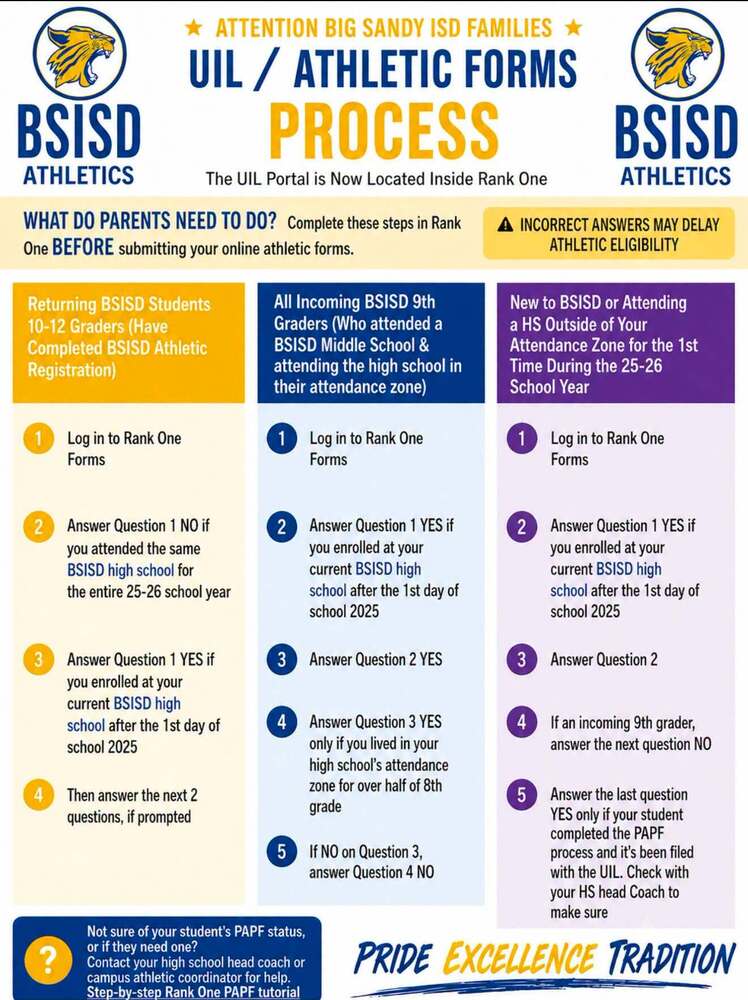
Parents and guardians of student-athletes entering grades 9–12 must complete the required UIL athletic forms through Rank One.
UIL has partnered with Rank One to manage athletic eligibility forms. Parents and guardians will need to create a Rank One account and complete the required online forms for their student-athlete.
Please review the attached graphic carefully, as the required steps vary depending on whether your student is:
A returning Big Sandy ISD high school student
An incoming 9th-grade student who attended Big Sandy Junior High last year
New to Big Sandy ISD or attending a high school outside of their attendance zone
Getting Started
Go to https://rankone.com/Parent/Parent
Select Online Forms.
Choose Texas as your state.
Select Big Sandy ISD.
Log in or create a parent account to complete your student's athletic forms.
Helpful Resources
Rank One Parent Portal: https://rankone.com/Parent/Parent
Step-by-Step Parent Guide: https://hq.rankone.com/kb/uil-parent/pro/filling-out-a-papf-form-as-a-parent-or-guardian
If you have questions regarding your student's athletic eligibility or PAPF status, please contact the Big Sandy ISD Athletic Department.